When you receive "misscall sms", or when a friend asks you to check a number, or when you want to check a redundant number/contact in your phonebook, it is always a chore - you'd have to dial the number and see if a name comes out on the screen, and the need to cancel the call just in time before it actually connects. I find it troublesome!
Well, i'm glad i found this very useful app - Qfind v1.20 (Qfind Contact Search - visit their website for more info). It is a JAR or java application so any other phone with java support will be able to use this app, i guess. It lets you search a contact in your phonebook by just keying in the phone number, that way you will be able to see if a contact number is saved twice with different names, and you can check if a certain number exists in your phonebook without the need to try dialling it! Neat, huh? Qfind is truly a quick finding application.
Well it seems the app was no longer developed since quite sometime ago, so it may not worked its best with a Nokia E71 (or qwerty keyboard for the matter - alphabet search does not work) but it still does the job nonetheless.
You can download it from HERE, as always... :)
Now for a brief guide on how to use it (read carefully as this is important):-
1. Upon starting up the app, you will be asked/prompted about allowing the software to access your phone, so just accept / press 'yes' to all the prompts.
2. Once the app is running, you will see the main screen with your phone book list shown on the screen and a top bar which is to be used to key in the numbers.
3. Note there's an "#abc" tag at the bottom bar. I suppose its used to key in 'alphabets' but i cannot seem to make it work. Anyway you'll have to press "func (bottom left key) + # (hatch key)" and you will notice the tag changed to "#123". Now i suppose it is to key in 'numbers'.
4. You'll have to press "func" key (bottom left key) TWICE - this is to shift the qwerty keyboard from 'alphabets' to 'numbers' mode.
5. OK now you can key in numbers. :) note that the contact list will change to show the contacts that contains the numbers you typed in.
6. Note that if you want to 'backspace' or delete the numbers, press 'ENTER' key and not the 'backspace' key on your E71 qwerty keyboard. Ackward, huh? Well like i said it was not really developed for qwerty keayboard, i guess.
Hope it works for you. Let me know if you find any problem. Cheers. :)
Showing posts with label applications. Show all posts
Showing posts with label applications. Show all posts
2011-02-21

2011-02-14
Nokia E71: Transfer Files using WIFI due to slow data transfer
If you are frustrated with the speed of your Nokia E71's data transfer, well many are sharing the same feeling, i suppose, since i had a similar remark from a friend.
To understand the issue, you may have to consider this:
1. Nokia E71 is using USB1.1 format which has maximum data transfer speed of 12Mbps
2. The newer E72 is using USB2.0 format which has maximum data transfer speed of 480Mbps
Therefore you can understand the significance of the slow data transfer encountered by Nokia E71 users. Note: 'Mbps' stands for Mega Bit per second.
Now for a 'solution', by utlizing the WIFI connection on the E71 which is using 802.11g connection, we can enhance the data transfer speed to a maximum 54Mbps. So how do we use the WIFI connection for data transfer? Well unfortunately such capability does not come built-in, therefore a certain symbian application is needed: SymNC by Telexy Networks. (The application is under 'device networking' > Network Commander) The application is not free, though can be tested before purchase.
Previously this app was known as SymSMB.
Head on to their website to give this application a trial run. Truly worth it!!
To understand the issue, you may have to consider this:
1. Nokia E71 is using USB1.1 format which has maximum data transfer speed of 12Mbps
2. The newer E72 is using USB2.0 format which has maximum data transfer speed of 480Mbps
Therefore you can understand the significance of the slow data transfer encountered by Nokia E71 users. Note: 'Mbps' stands for Mega Bit per second.
Now for a 'solution', by utlizing the WIFI connection on the E71 which is using 802.11g connection, we can enhance the data transfer speed to a maximum 54Mbps. So how do we use the WIFI connection for data transfer? Well unfortunately such capability does not come built-in, therefore a certain symbian application is needed: SymNC by Telexy Networks. (The application is under 'device networking' > Network Commander) The application is not free, though can be tested before purchase.
Previously this app was known as SymSMB.
Head on to their website to give this application a trial run. Truly worth it!!
2010-03-18
FontRouter LT: Add Unicode Fonts or change fonts of your E71
Using your symbian phone, have you ever get sms messages with SQUARES in it?? Well, the message isn't corrupted, nor is your phone. It's just symbian's way of saying "i don't recognize the font".
So what do you do when faced with such incident? Well luckily some kind souls had helped to develop this great app called FontRouter LT and also other fun fonts to pair it with, all is well..
1. What you will need is to download THIS. It shall consist of Fontrouter LT app, Dedit app, Freesigner app and also two .ttf files.
2. Plug in your phone to your computer and transfer all the files to your phone. For convenience, just copy either one (only one) of the .ttf file into Memory card @ E:\data\fonts (make the folder if it isn't available)
2. You shall need to sign the FontRouter app (the other apps are already signed). If you don't know how to go around this, you can refer to THIS site which has it detailed out. Of course there are other ways to do this, but i prefer the signing from the phone and with cert + key method as it will be convenient in the long run as you can easily sign other apps as well. As for the cert + key, i recommend THIS site which i had acquired my keys personally. It needs a free register and it has english menus. The freesigner app i attached in this kit is just in case you want to sign the app using the methods described from the earlier site given.
3. Once signed, install the fontrouter LT app into your phone. Just ignore any warning messages and proceed with installation. NOTE: INSTALL INTO MEMORY CARD. This is important as some font files may have crash issues with the phone and if you encounter this, simply unplug your memory card and restart phone. If it happens to crash with it on the phone memory, only way out is to hard reset the phone and that would delete all data on the phone.
4. Now install Dedit app. This is to allow editing of .ini files straight away from your phone.
5. Once done, open up Memory card @ E:\data\fonts and you will notice there is fontrouter.ini file in it. Open it up and change 'FixFontMetrics' and 'FixCharMetrics' values from '0' to '1'.
6. You're done. Restart your phone and take note of the font changes.
TIPS:-
i. If the fonts are unusually big, open fontrouter.ini and change the value 'ZoomRatio' to a lower value. This works vice versa.
ii. The app can change the font using whatever truetype font file (.ttf); however be wary that some font files have different layouts (especially windows font files) and therefore may not be compatible with your phone. Best is to surf the net for font files developed specially for phones, such as what the kind folks at IPMart Forums are doing. You'll need to be a member (free) to access and download from the site.
iii. For a fast font changing; change value [Global] 'Enable' to '0' and reboot your phone (I use JBAK's reboot option for fastest phone restart). Use activefile to change the fonts in the Memory Card @ E:\data\fonts folder. Change value 'Enable' back to '1' and then reboot your phone. You will then notice that the fonts are changed. Let me know if you know any other better way.
Do you have any other tips? :)
So what do you do when faced with such incident? Well luckily some kind souls had helped to develop this great app called FontRouter LT and also other fun fonts to pair it with, all is well..
1. What you will need is to download THIS. It shall consist of Fontrouter LT app, Dedit app, Freesigner app and also two .ttf files.
2. Plug in your phone to your computer and transfer all the files to your phone. For convenience, just copy either one (only one) of the .ttf file into Memory card @ E:\data\fonts (make the folder if it isn't available)
2. You shall need to sign the FontRouter app (the other apps are already signed). If you don't know how to go around this, you can refer to THIS site which has it detailed out. Of course there are other ways to do this, but i prefer the signing from the phone and with cert + key method as it will be convenient in the long run as you can easily sign other apps as well. As for the cert + key, i recommend THIS site which i had acquired my keys personally. It needs a free register and it has english menus. The freesigner app i attached in this kit is just in case you want to sign the app using the methods described from the earlier site given.
3. Once signed, install the fontrouter LT app into your phone. Just ignore any warning messages and proceed with installation. NOTE: INSTALL INTO MEMORY CARD. This is important as some font files may have crash issues with the phone and if you encounter this, simply unplug your memory card and restart phone. If it happens to crash with it on the phone memory, only way out is to hard reset the phone and that would delete all data on the phone.
4. Now install Dedit app. This is to allow editing of .ini files straight away from your phone.
5. Once done, open up Memory card @ E:\data\fonts and you will notice there is fontrouter.ini file in it. Open it up and change 'FixFontMetrics' and 'FixCharMetrics' values from '0' to '1'.
6. You're done. Restart your phone and take note of the font changes.
TIPS:-
i. If the fonts are unusually big, open fontrouter.ini and change the value 'ZoomRatio' to a lower value. This works vice versa.
ii. The app can change the font using whatever truetype font file (.ttf); however be wary that some font files have different layouts (especially windows font files) and therefore may not be compatible with your phone. Best is to surf the net for font files developed specially for phones, such as what the kind folks at IPMart Forums are doing. You'll need to be a member (free) to access and download from the site.
iii. For a fast font changing; change value [Global] 'Enable' to '0' and reboot your phone (I use JBAK's reboot option for fastest phone restart). Use activefile to change the fonts in the Memory Card @ E:\data\fonts folder. Change value 'Enable' back to '1' and then reboot your phone. You will then notice that the fonts are changed. Let me know if you know any other better way.
Do you have any other tips? :)
2010-03-10
Block / Ban Unwanted Calls Using Your Nokia E71
Did you know that your E71 comes with free apps such as Quickoffice version 6.0, Advanced Call Manager and others?
Well if you ever happened to be harrassed by unknown callers and really need to block/ban unwanted calls from your E71, the application 'Advanced Call Manager' by Webgate JSC works wonders. If you happened to have lost the app, you can download it here.
Install the app into your E71 and onced turned on, you will see this screen:
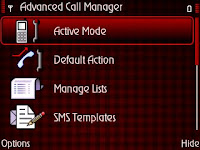
Go to the 'manage lists' and create a new list; i named it 'black' for blacklist.
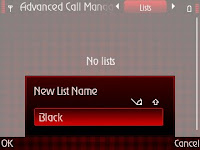
Once the list is done, configure the list by adding 'new' number or if you've saved the numbers, choose them from 'phonebook'; this number shall be the number that you would like to blacklist/block/ban.
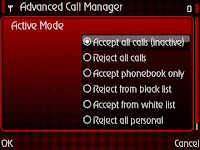
Thereafter, go to 'active mode' and select the active mode - 'reject from black list' option. You shall be asked for a list and you can just select the 'black' list you made earlier.
Go to 'default action' and select the option of your preference; which for me is just 'send busy tone'.
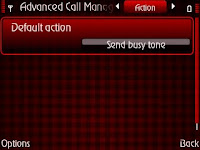
Thats it! You're done. All the numbers in the 'black' list will be handled by the app.
Note that you will need the app to be permanently running in the background. Select 'options>preference' and turn on 'auto run' and 'system application' for the best results.
You can also 'play' with the callers by setting the 'default action' to 'answering machine' and choose a pre-recorded greetings; just in case you are so annoyed by the callers that you want to return the favour.
You should explore the app further and you will notice that it is actually worth using as an answering machine at times where you are busy or in a meeting. It comes with many options and features, profiles and even locator scanner for automated profile changes which should be a very useful tool for business users. The best part is that the recorded messages are in your phone which is easily accessible at any time convenient for you.
Cheers and have fun using this wonderful app.
Well if you ever happened to be harrassed by unknown callers and really need to block/ban unwanted calls from your E71, the application 'Advanced Call Manager' by Webgate JSC works wonders. If you happened to have lost the app, you can download it here.
Install the app into your E71 and onced turned on, you will see this screen:

Go to the 'manage lists' and create a new list; i named it 'black' for blacklist.

Once the list is done, configure the list by adding 'new' number or if you've saved the numbers, choose them from 'phonebook'; this number shall be the number that you would like to blacklist/block/ban.
Thereafter, go to 'active mode' and select the active mode - 'reject from black list' option. You shall be asked for a list and you can just select the 'black' list you made earlier.

Go to 'default action' and select the option of your preference; which for me is just 'send busy tone'.

Thats it! You're done. All the numbers in the 'black' list will be handled by the app.
Note that you will need the app to be permanently running in the background. Select 'options>preference' and turn on 'auto run' and 'system application' for the best results.
You can also 'play' with the callers by setting the 'default action' to 'answering machine' and choose a pre-recorded greetings; just in case you are so annoyed by the callers that you want to return the favour.
You should explore the app further and you will notice that it is actually worth using as an answering machine at times where you are busy or in a meeting. It comes with many options and features, profiles and even locator scanner for automated profile changes which should be a very useful tool for business users. The best part is that the recorded messages are in your phone which is easily accessible at any time convenient for you.
Cheers and have fun using this wonderful app.
2010-02-05
GPS, A-GPS, GPRS CHARGES...?
Thought i'd write this simple post since i had the sudden concern over the network data charges when using garmin xt on my E71.
In case you're new to this, GPS is basically a global positioning system which allows the GPS device to track and lock your location (well the device's location) by triangulating your location from satellites in space (You can check it out further here); GPS is readily available on my E71 and i honestly believe it is such a waste to have a smartphone which has GPS but not use it. I salute whoever the smart fella who invented this GPS device!
A-GPS which stands for Assisted-GPS, is where the GPS device connects to a satellite tower via the phone's internet network, to assist the GPS to calculate the location and speed up the signal locking of the GPS device. This is the part where users will be charged by their network provider for the data usage. The GPS connects to the satellite tower via GPRS or other internet means such as EDGE, 3G or other mobile internet (Wifi should not be considered as you're on the move).
Question is, how does A-GPS works?
To sum it all up, upon starting the GPS (Garmin software), it will first try to lock the satellite signal, at same time it sends small packets of data via the GPRS or mobile internet to assist the GPS device in doing its job. So the satellite tower shall assist to provide info of the nearest location of the GPS and assist as a triangulating point. Basically its only a 1 time connection and just to lock the signal, thereafter navigation should rely only on the internal GPS, therefore no other data charges will be affected. However, be cautioned - if the GPS device looses its signal lock due to bad weather or was restarted, and requires the GPS to search for the signal lock again, there may be instances of the A-GPS reconnecting, but i am not sure about this and have yet to confirm it.
How about the data usage?
For every signal lock with A-GPS, generally less than 10KB of data is used.
Let's try this, clear counter of your packet data log from your phone's MENU>LOG>PACKET DATA, turn on your garmin software, hide it in background and go back to MENU>LOG>LIST. You may notice the actual data which was received and whether via GPRS,3G,EDGE or others. I myself tried this and received about 3KB - 5KB on my 3G for every lock. I believe the satellite signal strength and length of time to lock to the satellites determines the amount of data transferred.
Anyway base on my data plan, i'm charged about RM0.10 for every signal lock, hardly a bother to me but surely a free piece of mind as i can almost immediately get a GPS lock rather than waiting few minutes for it (if A-GPS is turned off).
CAUTION
U may want to consider turning off A-GPS if you go overseas, as by then data roaming charges shall apply. Get to know the charges first, some countries may have minimum usage such as 100KB and such, which will surely cost alot due to currency exchange. GPS will still work fine without A-GPS, only may take slightly longer time for the first signal lock.
If you have a GPS device which disconnects a lot and reactivates A-GPS many times, you may also want to consider turning it off. Do a trial run, clear counters, run garmin and navigate it for a while, once done check the log to see how much data was transferred. If you can live with it, i'd definitely recommend having it turned on!
Just in case you need to turn it off, go to MENU>TOOLS>SETTINGS>GENERAL>POSITIONING>POSITIONING METHOD>Untick 'Assisted GPS'
In case you're new to this, GPS is basically a global positioning system which allows the GPS device to track and lock your location (well the device's location) by triangulating your location from satellites in space (You can check it out further here); GPS is readily available on my E71 and i honestly believe it is such a waste to have a smartphone which has GPS but not use it. I salute whoever the smart fella who invented this GPS device!
A-GPS which stands for Assisted-GPS, is where the GPS device connects to a satellite tower via the phone's internet network, to assist the GPS to calculate the location and speed up the signal locking of the GPS device. This is the part where users will be charged by their network provider for the data usage. The GPS connects to the satellite tower via GPRS or other internet means such as EDGE, 3G or other mobile internet (Wifi should not be considered as you're on the move).
Question is, how does A-GPS works?
To sum it all up, upon starting the GPS (Garmin software), it will first try to lock the satellite signal, at same time it sends small packets of data via the GPRS or mobile internet to assist the GPS device in doing its job. So the satellite tower shall assist to provide info of the nearest location of the GPS and assist as a triangulating point. Basically its only a 1 time connection and just to lock the signal, thereafter navigation should rely only on the internal GPS, therefore no other data charges will be affected. However, be cautioned - if the GPS device looses its signal lock due to bad weather or was restarted, and requires the GPS to search for the signal lock again, there may be instances of the A-GPS reconnecting, but i am not sure about this and have yet to confirm it.
How about the data usage?
For every signal lock with A-GPS, generally less than 10KB of data is used.
Let's try this, clear counter of your packet data log from your phone's MENU>LOG>PACKET DATA, turn on your garmin software, hide it in background and go back to MENU>LOG>LIST. You may notice the actual data which was received and whether via GPRS,3G,EDGE or others. I myself tried this and received about 3KB - 5KB on my 3G for every lock. I believe the satellite signal strength and length of time to lock to the satellites determines the amount of data transferred.
Anyway base on my data plan, i'm charged about RM0.10 for every signal lock, hardly a bother to me but surely a free piece of mind as i can almost immediately get a GPS lock rather than waiting few minutes for it (if A-GPS is turned off).
CAUTION
U may want to consider turning off A-GPS if you go overseas, as by then data roaming charges shall apply. Get to know the charges first, some countries may have minimum usage such as 100KB and such, which will surely cost alot due to currency exchange. GPS will still work fine without A-GPS, only may take slightly longer time for the first signal lock.
If you have a GPS device which disconnects a lot and reactivates A-GPS many times, you may also want to consider turning it off. Do a trial run, clear counters, run garmin and navigate it for a while, once done check the log to see how much data was transferred. If you can live with it, i'd definitely recommend having it turned on!
Just in case you need to turn it off, go to MENU>TOOLS>SETTINGS>GENERAL>POSITIONING>POSITIONING METHOD>Untick 'Assisted GPS'
2009-12-11
Mobile Messenger with Popup Notifications - NIMBUZZ !!!
If you're using Nokia E71, i suppose you'd be familiar with the coolest mobile messenger app which can connect you to all your skype, YM, gtalk, ICQ, MSN and others - NIMBUZZ.
Well it just got cooler with the latest version 2.2; it now supports POPUP NOTIFICATIONS. So when you hide the nimbuzz in your phone's background, and there's a chat activity such as chat messages from your contacts, it'll popup the message at your E71's main screen. How cool is that?? simple, yet brilliant.
Of course there are other cooler features like chat history, twitter and other stuffs, head on to their website to check it out.
IF you just want to download the fun, you can download it HERE
Well it just got cooler with the latest version 2.2; it now supports POPUP NOTIFICATIONS. So when you hide the nimbuzz in your phone's background, and there's a chat activity such as chat messages from your contacts, it'll popup the message at your E71's main screen. How cool is that?? simple, yet brilliant.
Of course there are other cooler features like chat history, twitter and other stuffs, head on to their website to check it out.
IF you just want to download the fun, you can download it HERE
2009-12-02
Quickoffice v6.2.153 Free Upgrade for Nokia E71
If you did the E71 firmware upgrade to the latest 400.21.013, you'll realize that the quickoffice supplied with the firmware upgrade is version 5.3, which is kinda weird since E71 owners have been given a free upgrade to version 6 already long ago.
Anyway, if you need the installer for the upgrade to version 6 without going through the registration process at quickoffice website, you can download the installer HERE.
Anyway, if you need the installer for the upgrade to version 6 without going through the registration process at quickoffice website, you can download the installer HERE.
2009-10-26
Upcode - the 1D barcode reader (and 2D barcodes as well)
If you use your barcode reader a lot, you’d like to know the best reader available. Well, I don’t search around much but I just found out this new app and went ahead to test it. It’s known as UPCODE, you can try it out from here.
As a benchmark, I used same method as previously, which is through the kaywa web generator and also quickmark code generator; the results:-
UPCODE managed to read only as much as 85 characters of Kaywa’s code and upto 120 characters of quickmark’s code.
So it seems quickmark’s apps are still the best for my E71, so far. And Nokia's native code reader is also better, i guess.
1 thing to note though, this upcode app allows code reading of 1D barcode! This should be a big plus point as the other readers do not offer this. So if you find this feature useful, then you might want to keep it.
As a benchmark, I used same method as previously, which is through the kaywa web generator and also quickmark code generator; the results:-
UPCODE managed to read only as much as 85 characters of Kaywa’s code and upto 120 characters of quickmark’s code.
So it seems quickmark’s apps are still the best for my E71, so far. And Nokia's native code reader is also better, i guess.
1 thing to note though, this upcode app allows code reading of 1D barcode! This should be a big plus point as the other readers do not offer this. So if you find this feature useful, then you might want to keep it.
2009-10-22
iON BatteryTimer and its stand-by plugin display problem

i just came across this iON BatteryTimer symbian application which is said can show accurate battery status for symbian phones. Interesting, really. Check out their website for more details.
I have just used it and so far the "accuracy" is still poor but i am just at my second re-charge and the software claims to show accurate results after 4-5 cycles of charging, so i won't comment on that just yet. I do like this software because of it's neat interface and what it is supposed to do, you just can't miss having this app.
PROBLEM
I had one problem though; the stand-by plugin which shows the battery status at the homescreen had some display problem with weird squares and doesn't look very nice.

SOLUTION
A good lad from a forum highlighted the possible cause which was rather obvious - the fonts of the stand-by plugin weren't recognized by my E71 unit.
So the simple solution was to change the native fonts in order to have it work. Well, there are many ways to change the native fonts in E71, a simple internet search will help you with it, but just a suggestion - i used fontrouter LT and it helped solve the problem. Careful with the font changing process as it is risky and be sure to read enough before attempting any. Good luck!

P/S: Checkout the powersaver mode (screensaver), really neat!
Nokia E71 Tip: Transfer Bluetooth Files from Messaging's Inbox to other folders
How ignorant of me. Har har.. I have been using this E71 for more than 6months and still cursing about how difficult it is to transfer files via bluetooth using this symbian phone. This is because bluetooth files transfer shall direct the file into the messaging inbox as a new message and only supported files such as jpeg, mp3 and words/excel files can be opened and saved when transfered using this bluetooth way. Other files with unknown extensions (such as rar files) cannot be opened nor saved to other folders.
If you need more info about activefile, please refer my previous post. Basically other file explorer software may also do the trick, i guess.
Using activefile, just simply browse to the "inbox" folder, and voila! there they are, the files are in there...Har har..
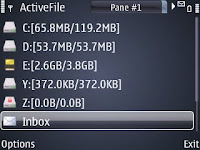
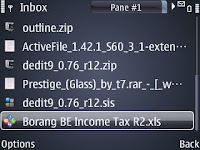
Well once you find the needed file using activefile, copying and transferring the files to other folder won't be that hard with the app's dual pane..just copy and paste!
Do you have other better ways? Let me know please.. :)
This message will pop up:
I normally will have to use my data cable to transfer these type of files directly into the folder needed and its always a hassle. I seldom share files with friends via bluetooth due to this matter as well. Now only i know of the simplest workaround for this issue and in fact using a simple software that i had been using all along - activefile.
If you need more info about activefile, please refer my previous post. Basically other file explorer software may also do the trick, i guess.
Using activefile, just simply browse to the "inbox" folder, and voila! there they are, the files are in there...Har har..


Well once you find the needed file using activefile, copying and transferring the files to other folder won't be that hard with the app's dual pane..just copy and paste!
Do you have other better ways? Let me know please.. :)
2009-07-07
NOKIA BARCODE READER NOT AS GOOD? (AS QUICKMARK)
If you have no idea of barcode reader, please refer my previous post HERE.
I tried this other software as suggested by a reader (yuc3697), Quickmark barcode reader and code generator and i can simply say i am impressed and it is by far better than nokia barcode reader. Simply put, the below are my findings:-
Quickmark barcode reader
As a comparison, i've used nokia barcode reader a lot and one limitation is the number of characters it can read. By using the same kaywa code generator, i find that the nokia barcode reader cannot read anything above 170 characters.
Using quickmark barcode reader, i was able to read up to 190 characters.
Quickmark code generator
As to earlier suggested kaywa code generator, i must say that this quickmark code generator is better simply because it does not require an internet connection - it is a software that can be installed on my PC! i find this most convenient.
Whats better is that by using this quickmark code generator along with the quickmark code reader, it can read up to 280 characters. :) superb!
i have been using these ever since. I use this barcode quite a lot since i need to sms addresses and details to colleagues and i cannot think of any other way more convenient than using this.
Let me know if you have different experience.
If you need to check it out further, please check their website HERE.
If you're using Nokia E71, you can download both the quickmark reader and generator HERE.
I tried this other software as suggested by a reader (yuc3697), Quickmark barcode reader and code generator and i can simply say i am impressed and it is by far better than nokia barcode reader. Simply put, the below are my findings:-
Quickmark barcode reader
As a comparison, i've used nokia barcode reader a lot and one limitation is the number of characters it can read. By using the same kaywa code generator, i find that the nokia barcode reader cannot read anything above 170 characters.
Using quickmark barcode reader, i was able to read up to 190 characters.
Quickmark code generator
As to earlier suggested kaywa code generator, i must say that this quickmark code generator is better simply because it does not require an internet connection - it is a software that can be installed on my PC! i find this most convenient.
Whats better is that by using this quickmark code generator along with the quickmark code reader, it can read up to 280 characters. :) superb!
i have been using these ever since. I use this barcode quite a lot since i need to sms addresses and details to colleagues and i cannot think of any other way more convenient than using this.
Let me know if you have different experience.
If you need to check it out further, please check their website HERE.
If you're using Nokia E71, you can download both the quickmark reader and generator HERE.
2009-06-11
E71 Free Symbian Applications I Use (Top 5)
Here's a list of some FREE apps which i have installed in my E71. I even included a download link for a compilation of all the apps at the bottom of this page, just in case you'd like to download it all in one go (i even added some extras).
-----
1. JBAK Taskman v1.00 by JBak
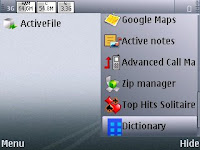
This would be the very first software i have to install on my E71. Reason? As symbian does not have an application shortcut list, this is one software which provides such feature. So it gives faster access to the apps installed on your device.
Not only does it gives access, it also gives control of the apps on your device. JBAK Taskman is actually a task manager and process viewer that easily beats the current nokia task list (accessible by long press of home button) so as that needs no further explanation, try it to explore its capabilities!
Link: Author's website
Oh and some useful features are battery status (not very accurate) and soft reboot.
2. Activefilev1.40(186) v1.42(1) by Alie Tan
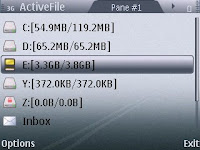
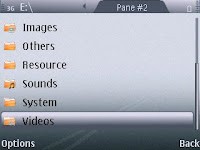
Activefile is a file manager software, so what's the big deal you might ask?
Well not only does it show the total size and current usage of your main drives (very important don't you think), it also allows browsing of files and folders in two (2) separate window panes. So this enables easy moving and copying of files from one to another.
EDIT: You can also access files transferred via bluetooth inside the message inbox using this app, superb!
Hint: If you can sign unsigned apps, the unsigned with extended version allows soft reboot and also screen capture.
Link: Author's website
3. Opera Mini v4.02(0) by Opera Software
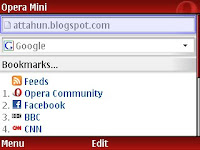
Simply another alternative to the existing nokia web browser, and preferred by most users. Faster and better loading of web pages and the 'back' option really does browse back to the previous page and this is a big plus point for me against the existing browser.
I don't have a .sis file for this, you'll have to download it directly to your mobile (better use wifi if you're not on flat data plan) by going to this link http://mini.opera.com (use my tip HERE if you're lazy to type)
Link: Software website
4. Worldmate v7.00(43) by Worldmate Inc
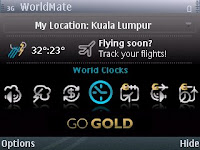
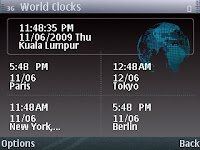
I consider this very important to me as i go around places sometimes and communicate with overseas client/colleagues, this software gives world clocks, exchange currencies, weather conditions as well as day/night map.
If you go gold (paid version), other services are offered such as flight schedules, alerts and flight status.
Link: Software website
5. Wefiv1.04(10) v1.07(21) by Wefi Ltd
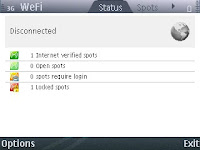
I've stopped using Nokia WLan search software ever since i found Wefi. Wefi scans the place for wifi connections and lets you see open, require sign in and locked spots from its scan. Wefi will also automatically connect to the best wifi connection, saves a lot of time rather than you testing each connection one by one.
EDIT: This new version seems slightly faster in searching and connecting to network.
Link: Software Website
-----
And then there are others like Nimbuzz, Fring, Google email client, Google maps, cCalc, Calcium and others but i thought i'll limit it to five (5) apps which i use the most first for this round.
What applications must you have on your device?
If anyone would like to download the above apps, they can be found HERE
NOTE: Post edited and apps updated as of 23rd Oct 09.
-----
1. JBAK Taskman v1.00 by JBak

This would be the very first software i have to install on my E71. Reason? As symbian does not have an application shortcut list, this is one software which provides such feature. So it gives faster access to the apps installed on your device.
Not only does it gives access, it also gives control of the apps on your device. JBAK Taskman is actually a task manager and process viewer that easily beats the current nokia task list (accessible by long press of home button) so as that needs no further explanation, try it to explore its capabilities!
Link: Author's website
Oh and some useful features are battery status (not very accurate) and soft reboot.
2. Activefile


Activefile is a file manager software, so what's the big deal you might ask?
Well not only does it show the total size and current usage of your main drives (very important don't you think), it also allows browsing of files and folders in two (2) separate window panes. So this enables easy moving and copying of files from one to another.
EDIT: You can also access files transferred via bluetooth inside the message inbox using this app, superb!
Hint: If you can sign unsigned apps, the unsigned with extended version allows soft reboot and also screen capture.
Link: Author's website
3. Opera Mini v4.02(0) by Opera Software


Simply another alternative to the existing nokia web browser, and preferred by most users. Faster and better loading of web pages and the 'back' option really does browse back to the previous page and this is a big plus point for me against the existing browser.
I don't have a .sis file for this, you'll have to download it directly to your mobile (better use wifi if you're not on flat data plan) by going to this link http://mini.opera.com (use my tip HERE if you're lazy to type)
Link: Software website
4. Worldmate v7.00(43) by Worldmate Inc


I consider this very important to me as i go around places sometimes and communicate with overseas client/colleagues, this software gives world clocks, exchange currencies, weather conditions as well as day/night map.
If you go gold (paid version), other services are offered such as flight schedules, alerts and flight status.
Link: Software website
5. Wefi

I've stopped using Nokia WLan search software ever since i found Wefi. Wefi scans the place for wifi connections and lets you see open, require sign in and locked spots from its scan. Wefi will also automatically connect to the best wifi connection, saves a lot of time rather than you testing each connection one by one.
EDIT: This new version seems slightly faster in searching and connecting to network.
Link: Software Website
-----
And then there are others like Nimbuzz, Fring, Google email client, Google maps, cCalc, Calcium and others but i thought i'll limit it to five (5) apps which i use the most first for this round.
What applications must you have on your device?
If anyone would like to download the above apps, they can be found HERE
NOTE: Post edited and apps updated as of 23rd Oct 09.
2009-06-08
NOKIA Barcode Reader: 2D Barcode
Often when i need to copy a web link to my mobile browser to download apps, or to send a home address to friends and colleagues, i find it inconvenient to type the long link with all the special characters and all...so i found this easy and most simple way to do it, which is to use a website to generate a 2D barcode (on my PC) and later use my 'barcode reader' to scan and copy the link (in my phone).
Check this website: http://qrcode.kaywa.com/ it can basically generate any web links, text, phone numbers and even sms.
Once you click generate, you'll be given something like this:

Use your barcode reader to scan and translate it! good luck trying..
If you don't have the barcode reader, you can try this java version of the reader at http://reader.kaywa.com/ but it may have some limitations so you'll have to try it to see if it works..
and by the way, i tried the barcode reader on my groceries stuffs as well and surely it wouldn't read anything, that's because those are known as '1D barcode' and not readable by the nokia barcode reader.. har har..
Check this website: http://qrcode.kaywa.com/ it can basically generate any web links, text, phone numbers and even sms.
Once you click generate, you'll be given something like this:
Use your barcode reader to scan and translate it! good luck trying..
If you don't have the barcode reader, you can try this java version of the reader at http://reader.kaywa.com/ but it may have some limitations so you'll have to try it to see if it works..
and by the way, i tried the barcode reader on my groceries stuffs as well and surely it wouldn't read anything, that's because those are known as '1D barcode' and not readable by the nokia barcode reader.. har har..
Subscribe to:
Posts (Atom)


 Posts
Posts


